
Ualett
Cabicash Solutions, IncFinance
4.61.28K Reviews
- Version
- 2.73.0
- Installs
- 500.00K
- Age Rating
- Everyone
Screenshots


Our Review of Ualett
 Analysis by Appyee
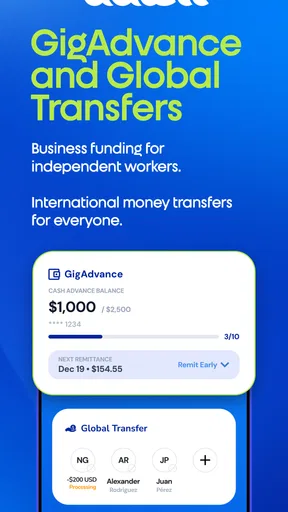
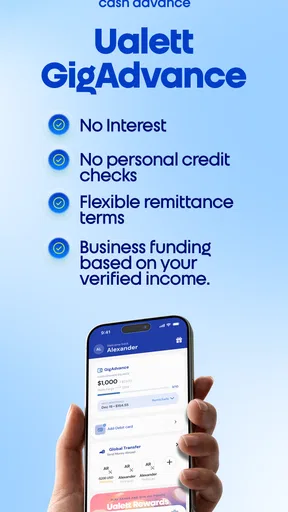
Getting paid as a gig worker can be less about finding another financial app and more about removing small points of friction between finishing a job and accessing your money. Ualett is a free finance app from Cabicash Solutions, Inc. built specifically around that kind of work. I found its appeal easy to understand: it is aimed at people whose income may arrive through gig platforms rather than through a conventional payroll schedule.
That focus makes it more interesting than a general budgeting app, but it also means the setup deserves attention. Ualett is not something I would install casually and expect to understand in a minute. The useful experience depends on entering information carefully, keeping account details consistent, and knowing whether a delay comes from the app, the connected work platform, or the financial system handling the transaction.
Where the experience can get stuck
The first thing I would tell a friend is not to judge Ualett too quickly if the opening setup feels slower than expected. Finance apps usually need accurate personal and account information, and gig workers often have several services involved at once: a work platform, a bank account, and sometimes another payment service. A mismatch in names, account details, or login information can make the process appear broken even when the app itself is working normally.
Ualett’s audience is quite specific. If you earn through driving, delivery, freelancing, or another platform-based arrangement, the app’s purpose should make sense. If your money comes from a regular employer and you mainly want expense categories, long-term budgeting, or investment research, I would look first at a traditional banking or budgeting tool. Ualett’s value is tied to the rhythm and irregularity of gig income, not to being an all-purpose replacement for every financial service.
Another common source of confusion is expecting an action to be instant simply because it starts inside an app. A request can pass through several stages before it is reflected elsewhere. I recommend checking the status shown in Ualett, then checking the destination account or connected service separately. Repeating the same request too quickly can make it harder to tell which attempt actually went through.
The app’s public reception is encouraging: it holds a 4.6 average from around 7,600 ratings and has more than 500,000 installs. Those figures suggest that Ualett has reached a meaningful group of users, but they should not replace your own checks. A high rating cannot guarantee that every bank, work platform, or individual financial situation will behave identically.
Why gig workers may notice the difference
Traditional personal finance apps often assume that money arrives on a predictable schedule. That assumption does not fit someone whose earnings change with completed jobs, busy periods, cancellations, or several apps used during the same week. Ualett starts from a different point: it is designed for the working pattern rather than for a standard salary cycle.
In practical terms, I would use it when I want a clearer bridge between gig activity and everyday cash needs. For example, imagine finishing a long delivery shift while needing money for fuel before the next shift. The useful question is not simply “How much did I earn this month?” It is “What is available, what is still moving through the system, and what can I safely use now?” That is the kind of situation in which a gig-focused finance app can feel more relevant than a general banking dashboard.
There is also a trade-off. A focused app can be easier to understand for its intended audience, but less useful if your financial life extends far beyond gig work. I would not expect Ualett alone to replace a complete bank account, a tax workflow, or a detailed household budget. It can sit alongside those tools, but I would keep important records in a separate place rather than treating one app as the only source of truth.
Setup checks that prevent avoidable trouble
Before starting, I would make sure the phone meets the basic requirement. Ualett supports Android 8.0 and later, and the current version is 2.73.0. Keeping the app updated is a sensible first step, especially if an older installation behaves strangely. I would also avoid beginning setup while switching repeatedly between weak mobile connections, because an interrupted session can look like an account problem when it is really a connection problem.
Use the same personal details that appear on the financial account or work service you are connecting. Small differences in spelling, abbreviations, or account ownership can create unnecessary friction. I would not guess at any field, and I would pause rather than submit information that I cannot verify. In finance, a careful minute at the start is preferable to trying to repair an incorrect setup later.
It is worth preparing the information you normally use for your gig work before opening the app. That might include the correct account credentials and a clear idea of where you want funds to go. The important tip is to distinguish between the account that receives work income and the account you use for daily spending. Confusing those two can make a successful transaction appear missing simply because you are checking the wrong destination.
I would also complete setup when I have enough time to read each screen. Rushing through a financial connection while working between jobs is a poor workflow. If the app asks you to confirm something, treat that confirmation as meaningful instead of tapping through automatically. This is one of the less obvious advantages of a deliberate setup: later troubleshooting becomes much easier because you know exactly which account and details were used.
Ualett is free to install, which lowers the barrier to trying it. Free does not mean that every surrounding financial service is free, however, so I would still read any transaction or account information shown during use before relying on a particular movement of money. I would never make a financial decision based only on the word “free” in an app listing.
What to check when the app appears unresponsive
My first troubleshooting pass would be simple. I would confirm that the phone has a stable connection, close and reopen Ualett, and check whether the device has enough available storage and battery to behave normally. If the app was recently updated, I would retry after the update has fully completed rather than testing while the phone is still finishing background work.
Next, I would check whether the problem is limited to one screen or affects the whole app. A single failed connection points toward account details or the external service involved. A completely frozen or repeatedly closing app points more toward the installation, device, or temporary service issue. Separating those cases prevents the common mistake of changing account information when the real issue is local to the phone.
I would avoid uninstalling immediately if I had not confirmed that I could safely sign back in. Removing an app can erase local session information, and that may add a new obstacle without fixing the original one. If a reinstall becomes necessary, I would first make sure I know the correct sign-in details and have access to any verification method required for the account.
Because this is a finance app, I would also avoid using public Wi-Fi for sensitive account work when a trusted connection is available. That is not a special Ualett feature or a promise about how every network behaves; it is simply a sensible habit when handling financial information. I would keep the phone’s operating system and screen lock in good order as well.
Recovering a workflow after a failed or delayed action
When something does not appear to complete, I would write down the time, the action I attempted, and what changed afterward. A short record is surprisingly useful. It stops me from repeating the same request and gives me a clear explanation if I need help later. I would then check both Ualett and the receiving account before trying again.
The safest recovery pattern is to verify, wait, and retry only when the status is clear. If the destination shows the money but Ualett still looks unchanged, the two displays may simply be out of sync. If neither side shows the expected result, I would review the account connection and the details entered during setup. If one side shows a pending state, I would treat that as an instruction to investigate rather than as permission to submit duplicates.
This is especially important for gig workers who may be moving money around between shifts. A rushed second attempt can create uncertainty about whether the first request failed or is still processing. My practical tip is to take a screenshot or note the visible status before leaving the screen, while avoiding the capture or storage of sensitive credentials. That gives you a reference without turning troubleshooting into a security risk.
If the issue continues, I would use the app’s available support route and describe the sequence rather than writing only “it does not work.” Include the device version, the app version, the screen where the problem happened, and whether the receiving account changed. Do not send passwords, full account numbers, or security codes. Clear, limited information is more useful and safer than a large message containing private details.
A second practical insight is to keep a separate earnings note while testing a new workflow. It can be a simple personal record of completed work and received funds. That does not duplicate the app unnecessarily; it gives you a way to reconcile what happened if a connection is delayed. For anyone whose income changes daily, this habit is more valuable than relying on memory.
When the app is not the cause
Sometimes Ualett may be blamed for a delay caused by the work platform. A gig service may not have finalized an earning, or it may still be processing a job adjustment. In that case, restarting Ualett cannot make the source platform finish its own work. I would check the original earnings screen first, especially if only one recent payment is affected while older activity looks normal.
The bank or destination account can also be the limiting point. Maintenance, verification checks, account restrictions, or a mismatch in ownership can interrupt a transfer outside Ualett’s control. If the app shows that an action was accepted but the account remains unchanged, I would investigate the destination directly rather than repeatedly editing the app.
Device settings can create misleading symptoms too. A phone that aggressively limits background activity may delay updates, while an outdated operating system can produce compatibility problems. I would check normal battery, network, and system settings before assuming that my account is damaged. These checks are basic, but they are particularly important when the same account works on one device and not another.
There is also a human factor: gig workers often use several accounts with similar names or email addresses. Selecting the wrong account during a busy day can look like a missing payment. I recommend confirming the destination by its identifying details before approving anything, then checking the same destination afterward. That small pause is one of the strongest safeguards in a multi-app income workflow.
For privacy, I would be cautious about sharing screenshots publicly. A screenshot can reveal names, balances, account fragments, or transaction references even when the main problem seems harmless. If support needs an image, remove unnecessary private information first. This advice applies whether the problem originates in Ualett, a bank, or a gig platform.
Who should use it and who should choose something else
I think Ualett is most suitable for someone who regularly earns through gig work and wants a finance tool shaped around that reality. It is also a reasonable option for a new gig worker who finds ordinary banking screens too disconnected from the way income arrives. The Everyone content rating makes it broadly accessible, and the free price makes experimentation less intimidating.
I would be more cautious if you need a complete financial command center. Someone looking for detailed investment analysis, extensive household budgeting, business bookkeeping, or a full tax record may be better served by dedicated tools. A conventional bank app is usually the stronger choice for core account management, while a budgeting app may be better for planning bills across several income sources.
Ualett may also be a poor fit if your work platform or financial arrangement does not match its intended gig-worker use. I would not force a connection simply because the app is popular. The right question is whether it reduces a real problem in your payment routine. If it adds another login, another balance to monitor, and no meaningful improvement, keeping your existing bank workflow may be wiser.
Compared with using only a bank app, Ualett offers a more work-focused perspective. Compared with a broad budgeting app, it is likely to feel less concerned with long-term categories and more concerned with the movement of gig income. Neither comparison makes one option universally better. I would use Ualett for the gig-income part of my routine and keep a bank or budgeting tool for responsibilities it handles more naturally.
My practical verdict after looking at the whole workflow
Ualett makes the most sense when the problem is specific: you earn through gig work and want a financial app that recognizes that irregular pattern. Its strong user reception, substantial install base, and focused purpose make it worth trying, particularly because it is free. I like the idea of using it as a bridge between work activity and accessible cash, provided I remain careful about account details and transaction status.
My main reservation is not about the concept but about the number of systems involved. When a payment is delayed, the app may be only one part of the chain. Users who expect every issue to be solved by refreshing the screen may become frustrated. The better approach is to identify the failing stage: setup, connection, source platform, destination account, or device.
If I were helping a friend begin, I would suggest starting with one clearly understood account, completing the setup without rushing, and testing the workflow with careful records. I would check the original gig platform and the receiving account whenever a result looked unusual, and I would avoid duplicate requests until the status was clear. Those habits make the app easier to evaluate honestly.
Overall, I would recommend Ualett to gig workers who want a focused finance companion, not to everyone looking for a universal money manager. It can be useful precisely because it is specialized, but that specialization is also the boundary of its appeal. Used alongside sensible account checks and a separate record of important earnings, it offers a practical way to organize the financial side of platform-based work without pretending to replace every other financial tool.
Verdict
Strengths of Ualett
- Fast access to earned wages through a simple mobile process.
- Useful for managing short-term cash flow between paydays.
- Application is designed for convenient use on smartphones.
- May help avoid some high-cost emergency borrowing options.
- Clear focus on wage access rather than a general-purpose loan.
Limitations of Ualett
- Availability depends on employer participation and eligibility requirements.
- Fees may apply, so review the total cost before requesting funds.
- Early access can reduce the amount available on your regular payday.
- Not intended to replace consistent budgeting or long-term financial planning.
- Support and transfer times may vary depending on account and banking details.
Similar Picks in This Category
View All
Google Wallet
Google LLC4.3

Airtel: Recharge, Bank & Loans
Airtel4.0

PayPal - Pay, Send, Save
PayPal Mobile4.2

DANA Indonesia Digital Wallet
PT Espay Debit Indonesia Koe4.5

Binance: Buy Bitcoin & Crypto
Binance Inc.4.8

Cash App
Block, Inc.4.7
Frequently Asked Questions
What is Ualett and how does it work?
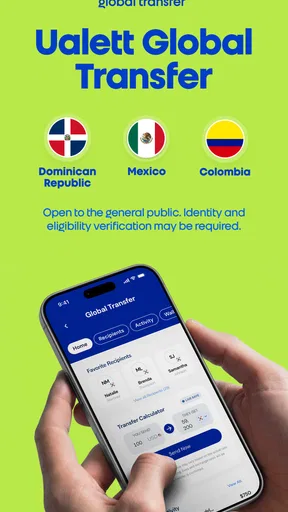
Ualett is a digital financial service designed to help users manage money, make payments, and access related financial features through a mobile application. After creating an account, users can typically review available services, follow identity-verification steps, and manage transactions from the app. The exact features may depend on the user’s location, eligibility, and the current terms offered by Ualett.
Is Ualett safe to use?
Ualett uses account-access controls and verification procedures intended to protect users and reduce unauthorized activity. However, no financial application can eliminate every risk. Before using the service, download it only from an official app store, create a strong password, protect verification codes, and avoid sharing sensitive information. It is also important to review Ualett’s privacy policy, fees, and security guidance.
What documents are required to create a Ualett account?
Account requirements can vary according to the country, service selected, and applicable financial regulations. Ualett may request personal information and identity documents, such as a government-issued identification card, along with contact details or additional verification. Make sure the information you submit is accurate and matches your official documents, because incomplete or inconsistent details may delay approval or restrict access to certain features.
Are there fees or limits when using Ualett?
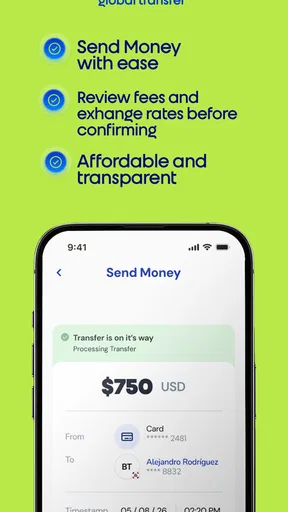
Ualett may apply fees, transaction limits, withdrawal restrictions, or other conditions depending on the feature you use and your location. These details can change over time, so users should check the fee schedule and service terms inside the app or on the official Ualett website before completing a transaction. Pay particular attention to exchange rates, transfer charges, and account limits.
What should I do if I cannot access my Ualett account or a transaction fails?
If you cannot sign in, first check your internet connection and confirm that you are using the latest version of the application. Use the official password-recovery or verification options rather than sharing your credentials with anyone. For failed, delayed, or unrecognized transactions, save the relevant details, avoid repeating the payment unnecessarily, and contact Ualett support through its official in-app or website channels.
